snmp configuration in cisco CBS 350 switch: The Cisco CBS 350 is a Small Business switch that can be configured for SNMP monitoring through its web-based management interface.
snmp configuration in cisco CBS 350 switch
Also Read: Airpro AP 4500 SNMP configuration|Airpro 4500 web GUI config
What is SNMP?
SNMP (Simple Network Management Protocol) is a network management protocol used to monitor and manage network devices such as switches, routers, firewalls, servers, and access points.
With SNMP, a network monitoring system can collect information from a Cisco switch, such as:
Interface status (up/down)
Interface traffic and bandwidth utilization
CPU and memory utilization
Device uptime
Port errors and packet statistics
Temperature and hardware information
System and interface alerts
SNMP is commonly used with network monitoring platforms such as PRTG, SolarWinds, Zabbix, ManageEngine, LibreNMS, and others.
Why is SNMP Used?
SNMP allows network administrators to monitor multiple network devices from a central monitoring system instead of manually logging in to every switch.
For example, if a Cisco CBS 350 switch has an interface that goes down, the monitoring server can detect the change and generate an alert.
A typical SNMP monitoring setup looks like this:
Cisco CBS 350 Switch → SNMP → Monitoring Server
The switch provides monitoring information, while the NMS (Network Management System) collects and displays that information.
SNMP Versions
The commonly used SNMP versions are:
| Version | Description |
|---|---|
| SNMPv1 | Basic SNMP version with community strings |
| SNMPv2c | Improved version of SNMPv1, commonly used |
| SNMPv3 | Adds authentication and encryption |
For new deployments, SNMPv3 is generally preferred because it provides better security.
SNMPv1/v2c use a community string such as public or private as a shared credential. These should not be used casually on production networks.
Steps for snmp configuration in cisco CBS 350 switch
Step 1: Log in to the CBS 350
Open a web browser and access the management IP address of the switch.
For example:
https://192.168.1.10 or assigned IP address
Log in using an administrator account.
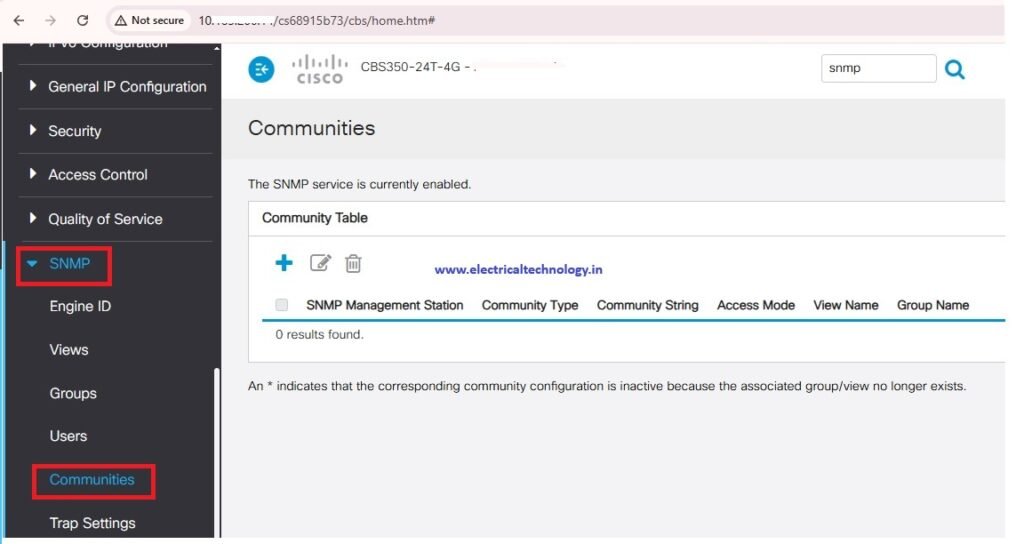
Step 2: Open the SNMP Configuration
From the CBS 350 web interface, navigate to the SNMP configuration section.
Depending on the firmware version, the menu can be found under:
Administration → SNMP
or within the SNMP configuration area.
The exact menu names can vary slightly between CBS 350 firmware releases.
Step 3: Enable SNMP
Enable the SNMP service on the switch.
Look for the option to enable or disable SNMP and make sure SNMP is enabled.
Save or apply the configuration.
snmp configuration in cisco CBS 350 switch
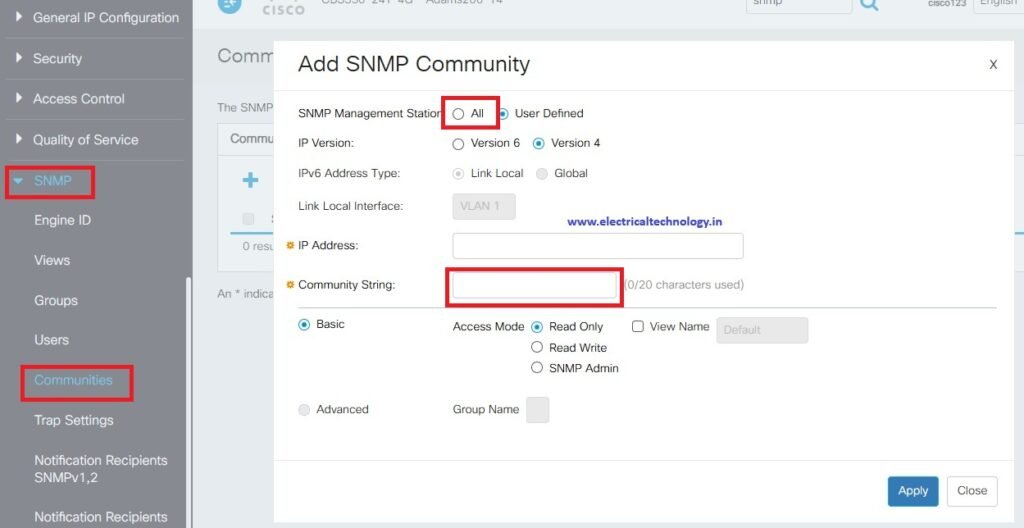
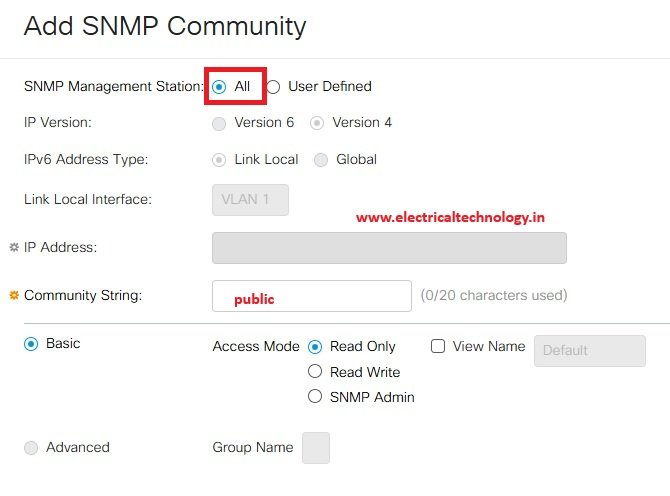
Step 4: Add snmp Community
Latest Posts
- Essential Networking Tools Every Network Technician Should Know
 Essential Networking Tools Every Network Technician Should Know: Network technicians use a variety of specialized tools to install, test, troubleshoot, and maintain network cables and communication systems. From preparing Ethernet …
Read moreEssential Networking Tools Every Network Technician Should Know
- How to Fix “You Aren’t Connected to Any Network” Error in Windows 10/11
 How to Fix “You Aren’t Connected to Any Network” Error in Windows 10/11: Are you seeing the “You Aren’t Connected to Any Network” message on your Windows 10 computer? This …
Read moreHow to Fix “You Aren’t Connected to Any Network” Error in Windows 10/11
- snmp configuration in cisco CBS 350 switch
 snmp configuration in cisco CBS 350 switch: The Cisco CBS 350 is a Small Business switch that can be configured for SNMP monitoring through its web-based management interface. snmp configuration …
 - Mobile Network Not Showing? Simple Settings to Fix Common SIM & Signal Problems
 Mobile Network Not Showing? Simple Settings to Fix Common SIM & Signal Problems: A mobile phone without a network connection can be frustrating, especially when calls, SMS messages, and mobile …
Read moreMobile Network Not Showing? Simple Settings to Fix Common SIM & Signal Problems
- Yes! The PC can work in Trunk port of a Managable switchHow pc can be connected in trunk port of managable switch: How to connect a PC/ Laptop to a trunk port of a Managable switch? Generally, in a PC RJ …
Read moreYes! The PC can work in Trunk port of a Managable switch
- Teamlink 721 Switch CLI configuration commands and Shortcut KeysTeamlink 721 Switch CLI configuration commands and Shortcut Keys: The Command Line Interface (CLI) is a medium for you to communicate with the TEAMLINK 721A. You can configure, monitor, and …
Read moreTeamlink 721 Switch CLI configuration commands and Shortcut Keys
- Airpro AP 4500 SNMP configuration|Airpro 4500 web GUI configAirpro AP 4500 SNMP configuration: Airpro 4500 configuration for snmp settings is shown in web GUI config mode. SNMP(Simple Network Management Protocol) SNMP: an application-layer standard protocol used for monitoring …
Read moreAirpro AP 4500 SNMP configuration|Airpro 4500 web GUI config
- SMPS Power plant for Telecom InstallationsSMPS Power plant for Telecom Installations: Power supply system is the heart of telecom systems & electronic equipments. For a reliable installation of telecom assets, reliable power supply system is …
- Commands for troubleshooting SFP optical levels OTDR testCommands for troubleshooting SFP optical levels OTDR test:To troubleshoot a link flapping port that has been err-disabled, use these diagnostic tools to isolate whether the fault lies in the fiber optics or …
Read moreCommands for troubleshooting SFP optical levels OTDR test
- [Solved]link flap cisco switch port error disabledlink flap cisco switch port error disabled: A Cisco switch port enters err-disabled state due to link flapping when the interface toggles up/down rapidly (typically 3+ times within 10 seconds), …