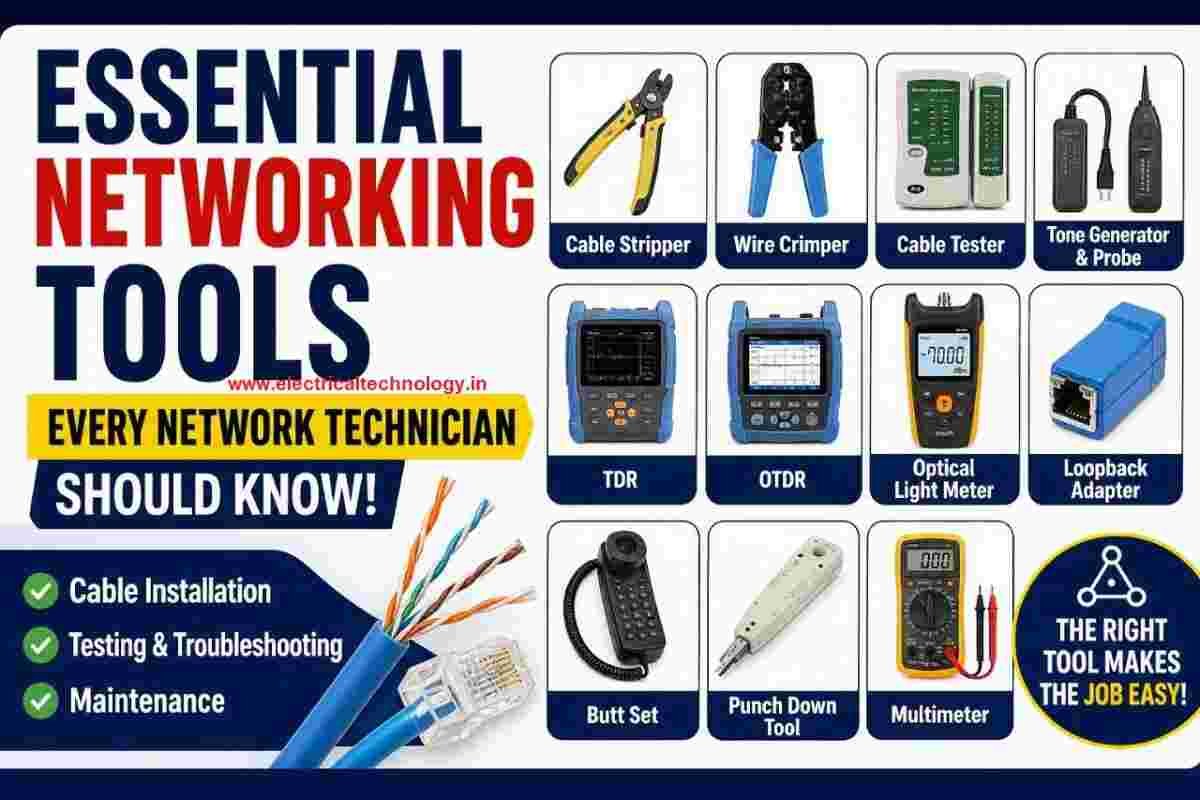
Essential Networking Tools Every Network Technician Should Know: Network technicians use a variety of specialized tools to install, test, troubleshoot, and maintain network cables and communication systems. From preparing Ethernet cables to testing fiber-optic links, each tool has a specific purpose.
Understanding these tools is important for networking students, IT professionals, network technicians, and competitive exam aspirants.
Read: How to Fix “You Aren’t Connected to Any Network” Error in Windows 10/11
Essential Networking Tools
In this guide, we’ll look at some of the most commonly used networking tools and their applications.
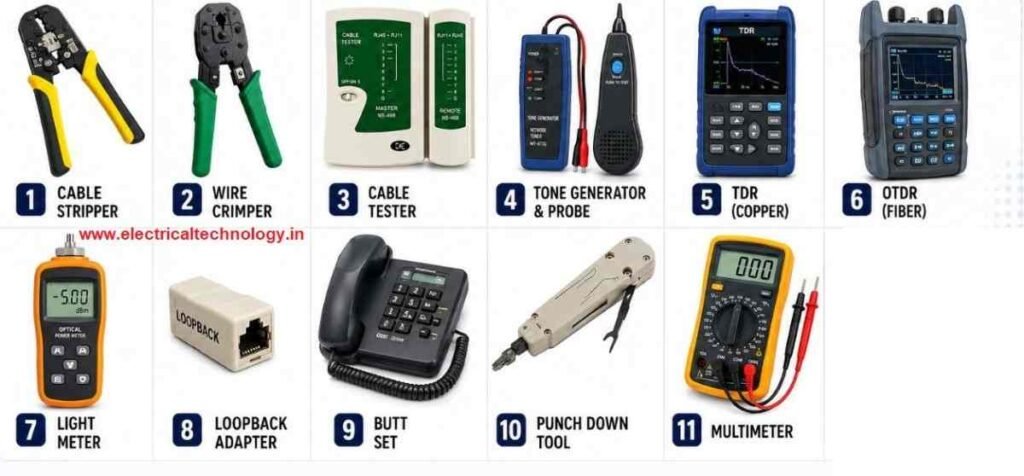
1. Cable Stripper
A cable stripper is used to remove the outer plastic jacket or shielding from a network cable.
When preparing twisted-pair Ethernet cables, the outer covering needs to be removed carefully to expose the individual wires inside.
Main use:
- Removes the outer insulation of network cables
- Helps prepare cables for connector installation
- Prevents unnecessary damage to the internal wires
A cable stripper is particularly useful when making or repairing Ethernet cables.
2. Wire Crimper
A wire crimper, also called a crimping tool, is used to attach connectors to network cables.
For Ethernet twisted-pair cables, it is commonly used to attach RJ45 connectors.
Main use:
- Attaches RJ45 connectors to Ethernet cables
- Secures the individual wires inside the connector
- Helps create custom network cables
For example, after arranging the eight wires in the correct order, the wires are inserted into an RJ45 connector and the crimping tool is used to secure the connector.
3. Cable Tester
A cable tester is used to check whether a network cable is correctly wired and functioning properly.
It can help identify problems such as:
- Open circuits
- Short circuits
- Incorrect wire arrangements
- Broken connections
- Miswired Ethernet cables
Cable testers are especially useful after creating a new network cable or when troubleshooting an existing cable.
4. Tone Generator and Probe
A tone generator and probe is useful when a technician needs to identify or trace a particular cable.
The tone generator sends a signal through the cable, while the probe is used to detect the signal at the other end.
Common applications:
- Identifying cables in a patch panel
- Tracing cables through walls or cable bundles
- Locating a specific cable among many cables
This tool can save considerable time when working with large network installations.
5. Time Domain Reflectometer (TDR)
A Time Domain Reflectometer (TDR) is an advanced cable-testing instrument used to locate faults in cables.
The device sends a signal through the cable and analyzes the reflected signal. Based on the reflection, a technician can identify problems and estimate where the fault is located.
A TDR can be used with cables such as:
- Twisted-pair cables
- Coaxial cables
Faults that can be detected include:
- Cable breaks
- Shorts
- Impedance changes
- Certain types of bends or cable damage
TDRs are particularly useful for troubleshooting longer cable runs.
6. Optical Time Domain Reflectometer (OTDR)
An Optical Time Domain Reflectometer (OTDR) performs a similar function to a TDR but is designed specifically for fiber-optic cables.
Instead of using an electrical signal, an OTDR sends pulses of light through the fiber and analyzes the returned reflections.
It can help technicians locate:
- Breaks in fiber
- Faults and discontinuities
- Excessive bends
- Connector or splice problems
- The approximate distance to a fault
OTDRs are important tools for installing and maintaining fiber-optic networks.
7. Optical Light Meter
A light meter, commonly called an optical power meter in fiber networking, measures the amount of optical power received through a fiber-optic cable.
It is useful for determining whether sufficient light is reaching the receiving end of a fiber link.
Main uses:
- Measuring optical signal strength
- Checking fiber links
- Troubleshooting excessive signal loss
- Verifying fiber-optic installations
A light meter is often used together with an appropriate optical light source when testing fiber links.
8. Loopback Adapter
A loopback adapter is a small device used to test a network port or interface.
The adapter connects the transmit and receive paths so that a device can send a signal and receive it back.
Main use:
Testing whether a network interface or port is functioning correctly.
Loopback testing can help technicians determine whether a problem is related to a network interface rather than the external cable or network connection.
9. Butt Set
A butt set is a telephone-line testing device traditionally used by technicians working with telephone systems.
It resembles a telephone handset and can be connected to telephone lines for monitoring and testing.
Common uses:
- Testing telephone lines
- Monitoring conversations on authorized test lines
- Checking line conditions
- Troubleshooting traditional telephone systems
Butt sets are particularly associated with telecommunications and legacy telephone networks.
10. Punch Down Tool
A punch down tool is used to terminate network or telephone wires on a punch-down block, such as a 110-style block or patch panel.
The tool pushes the wire securely into the appropriate terminal.
Many punch down tools also have a cutting mechanism that removes excess wire during termination.
Main uses:
- Terminating Ethernet cables
- Connecting wires to patch panels
- Installing telephone wiring
- Organizing structured cabling systems
It is an essential tool for technicians working with structured cabling.
11. Multimeter
A multimeter is a versatile electrical testing instrument that can measure different electrical quantities.
Depending on the model, a multimeter can measure:
- Voltage
- Resistance
- Current
- Continuity
The continuity function can be useful for checking whether an electrical path or conductor is complete.
Networking applications
Although a multimeter isn’t exclusively a networking tool, technicians may use it to troubleshoot electrical and cabling problems, check power supplies, and verify continuity where appropriate.
Always use the correct measurement mode and range for the circuit being tested.
Networking Tools at a Glance
| Tool | Primary Purpose |
|---|---|
| Cable Stripper | Removes the outer cable jacket |
| Wire Crimper | Attaches connectors such as RJ45 |
| Cable Tester | Checks cable continuity and wiring |
| Tone Generator & Probe | Traces and identifies cables |
| TDR | Locates faults in copper/coaxial cables |
| OTDR | Tests and locates faults in fiber-optic cables |
| Optical Light Meter | Measures optical power |
| Loopback Adapter | Tests network ports/interfaces |
| Butt Set | Tests and monitors telephone lines |
| Punch Down Tool | Terminates wires on punch-down blocks |
| Multimeter | Measures electrical values and continuity |
TDR vs OTDR
One of the most important differences to remember is between TDR and OTDR.
| Feature | TDR | OTDR |
|---|---|---|
| Full form | Time Domain Reflectometer | Optical Time Domain Reflectometer |
| Used for | Copper/coaxial cables | Fiber-optic cables |
| Signal used | Electrical signal | Light |
| Main purpose | Locate cable faults | Locate fiber faults |
| Typical faults | Opens, shorts, impedance changes | Breaks, bends, splices, signal loss |
A simple way to remember it is:
TDR → Electrical cables
OTDR → Optical fiber
Why Are Networking Tools Important?
Networking problems are not always caused by software or configuration. Physical cabling can also be responsible for connectivity problems.
A technician may need to determine whether the problem is caused by:
- A damaged cable
- Incorrect wiring
- A faulty connector
- A broken fiber
- A defective network port
- Excessive signal loss
- Incorrect cable termination
The right testing tool can make troubleshooting faster and more accurate.
Conclusion
Networking tools play an important role in cable installation, testing, troubleshooting, and maintenance. Basic tools such as cable strippers, crimpers, cable testers, and punch down tools are commonly used during installation, while specialized instruments such as TDRs and OTDRs help technicians locate faults in copper and fiber-optic networks.
For networking students and exam aspirants, learning the name, full form, purpose, and application of each tool is especially useful.
Quick Revision
Cable Stripper → Removes cable jacket
Crimper → Attaches RJ45 connector
Cable Tester → Checks cable wiring
Tone Generator → Traces cables
TDR → Tests copper/coaxial cables
OTDR → Tests fiber-optic cables
Light Meter → Measures optical power
Loopback Adapter → Tests ports/interfaces
Butt Set → Tests telephone lines
Punch Down Tool → Terminates wires
Multimeter → Measures electrical quantities
Latest Posts
- Essential Networking Tools Every Network Technician Should Know
 Essential Networking Tools Every Network Technician Should Know: Network technicians use a variety of specialized tools to install, test, troubleshoot, and maintain network cables and communication systems. From preparing Ethernet …
Read moreEssential Networking Tools Every Network Technician Should Know
- How to Fix “You Aren’t Connected to Any Network” Error in Windows 10/11
 How to Fix “You Aren’t Connected to Any Network” Error in Windows 10/11: Are you seeing the “You Aren’t Connected to Any Network” message on your Windows 10 computer? This …
Read moreHow to Fix “You Aren’t Connected to Any Network” Error in Windows 10/11
- snmp configuration in cisco CBS 350 switch
 snmp configuration in cisco CBS 350 switch: The Cisco CBS 350 is a Small Business switch that can be configured for SNMP monitoring through its web-based management interface. snmp configuration …
 - Mobile Network Not Showing? Simple Settings to Fix Common SIM & Signal Problems
 Mobile Network Not Showing? Simple Settings to Fix Common SIM & Signal Problems: A mobile phone without a network connection can be frustrating, especially when calls, SMS messages, and mobile …
Read moreMobile Network Not Showing? Simple Settings to Fix Common SIM & Signal Problems
- Yes! The PC can work in Trunk port of a Managable switchHow pc can be connected in trunk port of managable switch: How to connect a PC/ Laptop to a trunk port of a Managable switch? Generally, in a PC RJ …
Read moreYes! The PC can work in Trunk port of a Managable switch
- Teamlink 721 Switch CLI configuration commands and Shortcut KeysTeamlink 721 Switch CLI configuration commands and Shortcut Keys: The Command Line Interface (CLI) is a medium for you to communicate with the TEAMLINK 721A. You can configure, monitor, and …
Read moreTeamlink 721 Switch CLI configuration commands and Shortcut Keys
- Airpro AP 4500 SNMP configuration|Airpro 4500 web GUI configAirpro AP 4500 SNMP configuration: Airpro 4500 configuration for snmp settings is shown in web GUI config mode. SNMP(Simple Network Management Protocol) SNMP: an application-layer standard protocol used for monitoring …
Read moreAirpro AP 4500 SNMP configuration|Airpro 4500 web GUI config
- SMPS Power plant for Telecom InstallationsSMPS Power plant for Telecom Installations: Power supply system is the heart of telecom systems & electronic equipments. For a reliable installation of telecom assets, reliable power supply system is …
- Commands for troubleshooting SFP optical levels OTDR testCommands for troubleshooting SFP optical levels OTDR test:To troubleshoot a link flapping port that has been err-disabled, use these diagnostic tools to isolate whether the fault lies in the fiber optics or …
Read moreCommands for troubleshooting SFP optical levels OTDR test
- [Solved]link flap cisco switch port error disabledlink flap cisco switch port error disabled: A Cisco switch port enters err-disabled state due to link flapping when the interface toggles up/down rapidly (typically 3+ times within 10 seconds), …