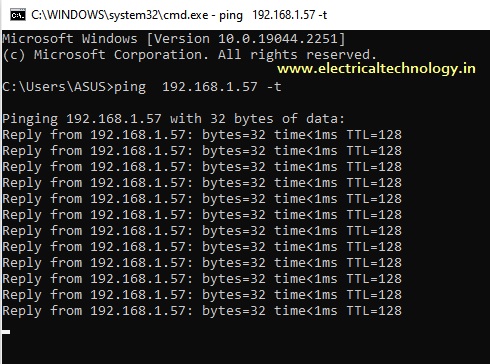
How to enable ping in windows 10
Why pings are Blocked or disabled in windows?
If you have a firewall enabled in Windows, ping requests are blocked by default.
How to Allow Ping in Windows Firewall?
To configure your firewall to allow pings, follow the appropriate instructions below.
- Search for Windows Firewall, and click to open it.
- Click Advanced Settings on the left.
- From the left pane of the resulting window, click Inbound Rules.
- In the right pane, find the rules titled File and Printer Sharing (Echo Request – ICMPv4-In).
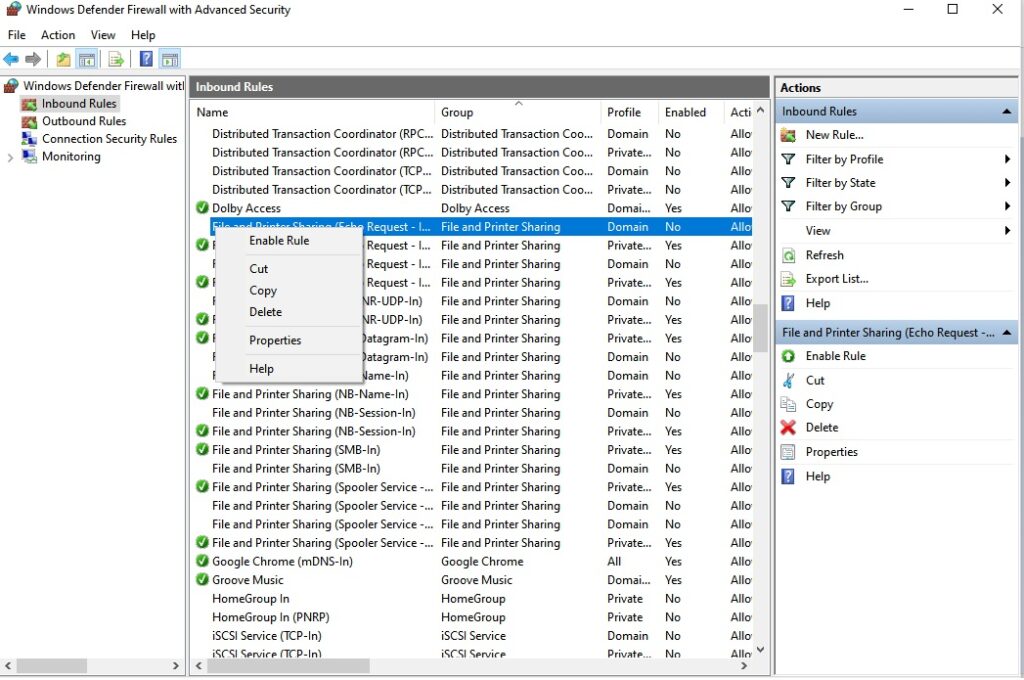
- Right-click each rule and choose Enable Rule
Allow Ping Requests in Windows 10
Step 1: Open the Windows Firewall
Click the start button then type firewall and click on “Windows Defender Firewall with Advanced Security”
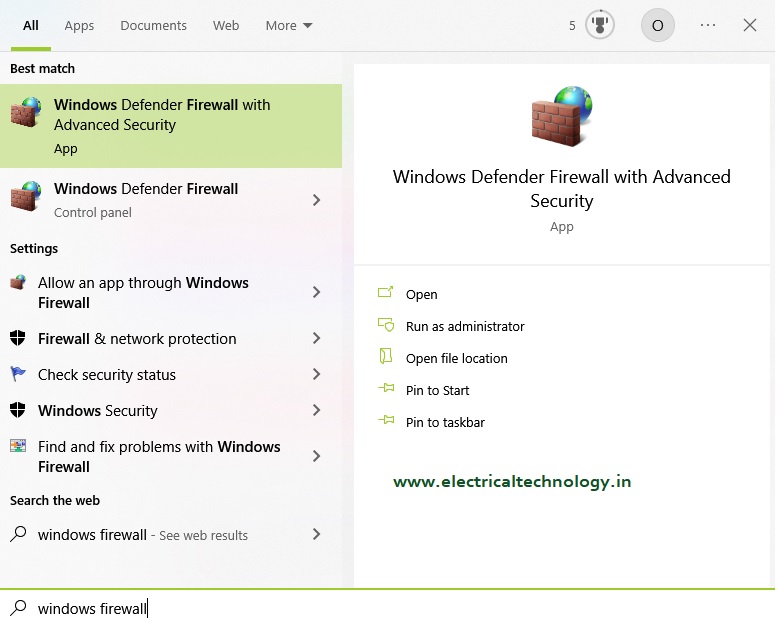
Step 2: Click on Inbound Rules
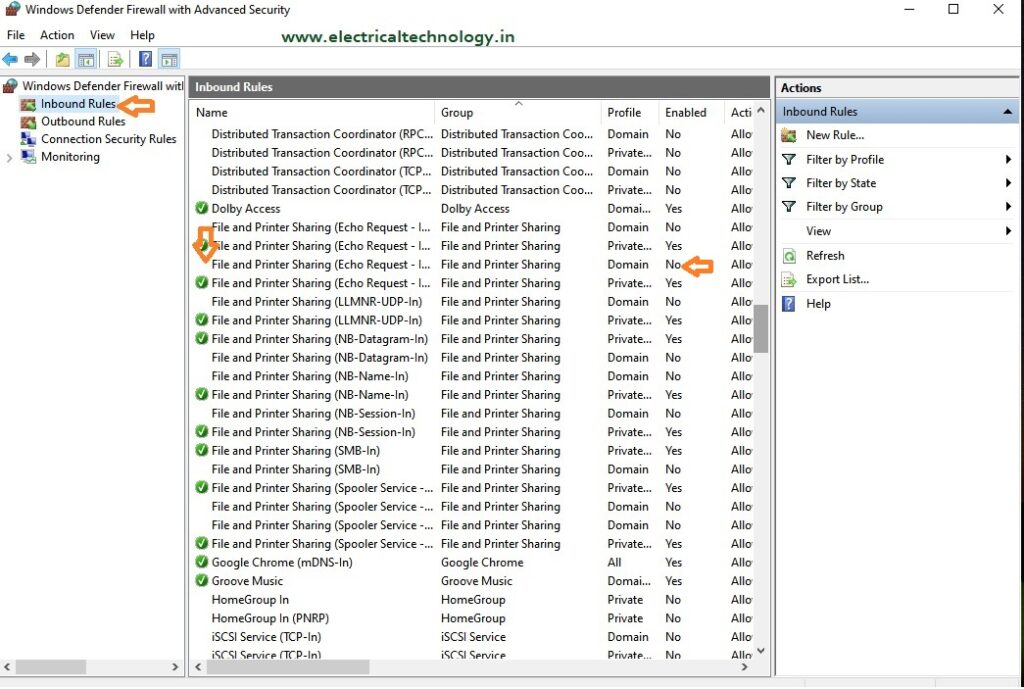
Step 3: In the inbound rule list scroll down to find the “File and Printer Sharing (Echo Request)
Find File and Printer Sharing (Echo Request – ICMPv4-In) Rule
Step 4: Right-click each rule and choose Enable Rule
How do I ping in win10?
- For Windows 10, go to Search in the taskbar and:
- Type “cmd” to bring up the Command Prompt.
- Open the Command Prompt.
- Type “ping” in the black box and hit the space bar.
- Type the IP address you’d like to ping (e.g., 192. XXX. X.X).
- Review the ping results displayed.
Does Windows 10 block ping by default?
By default, Windows Firewall with Advanced Security blocks ICMP Echo Requests from the network.
How do I know if ICMP is enabled in Windows 10?
If ICMP is not enabled in Windows 10 the ping command wont work.
- Essential Networking Tools Every Network Technician Should Know
 Essential Networking Tools Every Network Technician Should Know: Network technicians use a variety of specialized tools to install, test, troubleshoot, and maintain network cables and communication systems. From preparing Ethernet cables to testing fiber-optic links, each tool has a specific purpose. Understanding these tools is important for networking students, IT professionals, network technicians, and competitive …
Read moreEssential Networking Tools Every Network Technician Should Know
- How to Fix “You Aren’t Connected to Any Network” Error in Windows 10/11
 How to Fix “You Aren’t Connected to Any Network” Error in Windows 10/11: Are you seeing the “You Aren’t Connected to Any Network” message on your Windows 10 computer? This error can prevent you from accessing the internet even when your Wi-Fi router or Ethernet connection appears Read: Mobile Network Not Showing? Simple Settings to …
Read moreHow to Fix “You Aren’t Connected to Any Network” Error in Windows 10/11
- snmp configuration in cisco CBS 350 switch
 snmp configuration in cisco CBS 350 switch: The Cisco CBS 350 is a Small Business switch that can be configured for SNMP monitoring through its web-based management interface. snmp configuration in cisco CBS 350 switch Also Read: Airpro AP 4500 SNMP configuration|Airpro 4500 web GUI config What is SNMP? SNMP (Simple Network Management Protocol) is …
 - Mobile Network Not Showing? Simple Settings to Fix Common SIM & Signal Problems
 Mobile Network Not Showing? Simple Settings to Fix Common SIM & Signal Problems: A mobile phone without a network connection can be frustrating, especially when calls, SMS messages, and mobile data suddenly stop working. In some cases, the problem may not be with the SIM card or your mobile operator. A few network settings on …
Read moreMobile Network Not Showing? Simple Settings to Fix Common SIM & Signal Problems
- Yes! The PC can work in Trunk port of a Managable switchHow pc can be connected in trunk port of managable switch: How to connect a PC/ Laptop to a trunk port of a Managable switch? Generally, in a PC RJ 45 cable can be connected to access port in a manageable switch. In some NIC cards, there is option for using PC/laptop connected to trunk …
Read moreYes! The PC can work in Trunk port of a Managable switch