VPN not working on mobile data: If your VPN works on Wi-Fi but fails on mobile data, it is usually due to carrier protocol restrictions or a mismatch between the phone’s networking (IPv6) and the VPN’s server (IPv4).
How to solve VPN not working on mobile data
Fix the APN (Access Point Name) Protocol
Many modern mobile networks use IPv6 by default, but most VPNs require IPv4 to establish a stable tunnel.
Go to Settings > Mobile Network > SIM Info > Access Point Names.
Select your current APN and look for APN Protocol and APN Roaming Protocol.
Change these from “IPv6” to “IPv4” or “IPv4/IPv6”
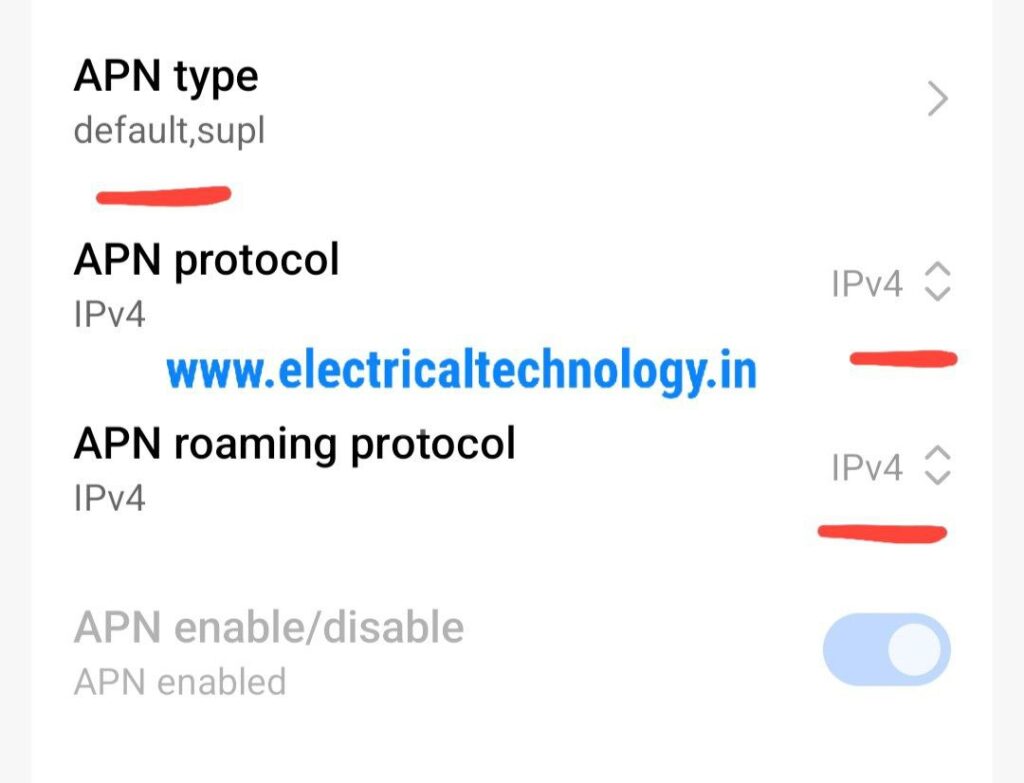
Note: If the fields are greyed out, create a new APN with the same details but manually set the protocol to IPv4.
also try the below settings, and after saving restart your phone.
Change the VPN Tunneling Protocol
Mobile carriers often block or throttle specific VPN ports (like port 500 for IPSec or 1194 for OpenVPN).
Open your VPN app settings and look for “Protocol”.
Switch to WireGuard (often more resilient on mobile) or OpenVPN (TCP).
Try setting the port to 443, which is standard for HTTPS traffic and rarely blocked
Disable Battery & Data Restrictions
Mobile operating systems aggressively “kill” background apps to save power, which can drop your VPN tunnel instantly.
Android: Go to Settings > Apps > [Your VPN App] > Battery and select “Unrestricted”.
iOS: Ensure “Background App Refresh” is enabled for the VPN app in Settings.
Turn off Data Saver or Low Power Mode, as these can block the persistent data stream a VPN requires
Advanced Troubleshooting
Obfuscation: If your carrier uses “Deep Packet Inspection” (DPI) to identify and block VPN signatures, enable “Obfuscated Servers” or “Stealth Mode” in your VPN app.
Check MTU Size: If the VPN connects but no data flows, the packet size (MTU) might be too large for the mobile network. Try lowering the MTU in your VPN settings to 1300 or 1200.
Reset Network Settings: As a last resort, go to Settings > System > Reset > Reset Network Settings. This will clear all Wi-Fi passwords and Bluetooth pairings but often fixes deep connectivity bugs.
- Essential Networking Tools Every Network Technician Should Know
 Essential Networking Tools Every Network Technician Should Know: Network technicians use a variety of specialized tools to install, test, troubleshoot, and maintain network cables and communication …
Read moreEssential Networking Tools Every Network Technician Should Know
- How to Fix “You Aren’t Connected to Any Network” Error in Windows 10/11
 How to Fix “You Aren’t Connected to Any Network” Error in Windows 10/11: Are you seeing the “You Aren’t Connected to Any Network” message on your …
Read moreHow to Fix “You Aren’t Connected to Any Network” Error in Windows 10/11
- snmp configuration in cisco CBS 350 switch
 snmp configuration in cisco CBS 350 switch: The Cisco CBS 350 is a Small Business switch that can be configured for SNMP monitoring through its web-based …
 - Mobile Network Not Showing? Simple Settings to Fix Common SIM & Signal Problems
 Mobile Network Not Showing? Simple Settings to Fix Common SIM & Signal Problems: A mobile phone without a network connection can be frustrating, especially when calls, …
Read moreMobile Network Not Showing? Simple Settings to Fix Common SIM & Signal Problems
- Yes! The PC can work in Trunk port of a Managable switchHow pc can be connected in trunk port of managable switch: How to connect a PC/ Laptop to a trunk port of a Managable switch? Generally, …
Read moreYes! The PC can work in Trunk port of a Managable switch